
Somewhere every day, someone copies an order from an email into a system, checks the total of a PDF invoice by hand, or enters the same data in two places. The work is familiar, and it rarely shows up in any cost calculation. Automation means that software does these steps. A person makes the decisions and checks the exceptions.
This article goes through what automation means in practice, which process to start with, which tools you need and which mistakes come up most often.
What automation means in practice
Automation is not one program. It usually has three parts:
- Systems that keep data in one place, such as an ERP, a warehouse system or a customer management tool.
- Interfaces that move data between systems without copying it.
- Document reading, which recognises the content of an order, invoice or spreadsheet and turns it into a proposal.
The difference matters. An interface moves data from a known source to a known target, but it cannot tell what is inside an email attachment. Document reading always needs a person to check the result, because the sources vary: one customer sends an Excel file, another a photo of a delivery note, a third a free-text message.
Good automation reduces repetitive manual work and errors. It does not remove responsibility: a person still approves an order until the process has proved it can be trusted.
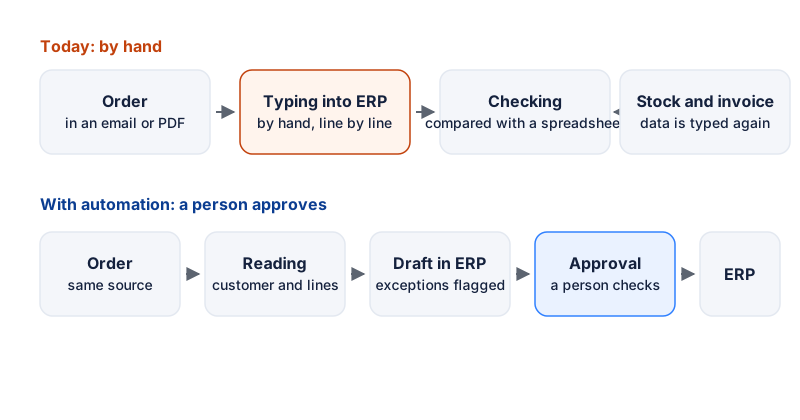
Figure 1: The same order handled two ways. At the top, the data is typed in by hand in three places. At the bottom, the system drafts the entry and a person approves it.
Before automating: map the process
Before any tool is chosen, the process is written down. Record four things:
- Where the process starts and ends. For example: “customer sends an order by email, ERP sales order is created, order confirmation is sent”.
- Who does what. One named owner who decides on changes to the process.
- How often and how long. A daily routine where each order takes a few minutes is a different problem from a monthly report.
- Where errors come from. A typing mistake in a product code, a wrong quantity or a forgotten shipping notice.
Once these are written down, many teams notice that the process is unclear even to the people doing it. In that case it is wiser to clarify it first. Automation that repeats an unclear process makes the same mistakes, only faster.
Which processes to automate first
Choose a first process with three features: it repeats every day, its steps are clear and the cost of an error is known. Below are common candidates across functions.
Sales and orders
Order handling is often the best first target because it touches the customer and the warehouse directly. A typical flow: the customer sends an order by email, as a PDF or as an Excel file, someone opens the attachment and types the lines into the ERP, and meanwhile the warehouse and the salesperson ask whether the products are in stock.
With automation, the order is read from its source: the customer is identified, lines and quantities are extracted, and exceptions such as an unknown product code or a missing delivery address are flagged separately. The draft goes to the salesperson, who approves it. Customer data stays in the same CRM, so the salesperson sees the history without asking the same questions twice.
Warehouse and purchasing
Stock balances stop matching when data moves between a spreadsheet and the system. Automation can post stock movements straight into the ERP, detect when a balance drops below the minimum and prepare a purchase proposal. A purchase order is not sent without approval, but the proposal is ready.
In a warehouse, the most useful point is often the gap between the system balance and the physical count. When counts are done regularly and differences are recorded, the data improves over time, and a yearly stocktake is no longer the only check.
Finance and invoices
Supplier invoice processing is a classic case. The invoice total, supplier, reference number and order confirmation are often entered twice. Automation reads the invoice, compares it with the order and flags differences: the total does not match, the supplier is unknown or no order can be found. Approved invoices go to accounting, and exceptions stay with a person.
Matching bank transactions to invoices is another repetitive task where clear rules and an exceptions list work well.
Customer service and communication
In customer service the same questions come back again and again: delivery time, price or order status. Automation can classify incoming messages by topic and propose a draft reply that uses the correct data from the system. A person checks the draft before it is sent. External messages are not sent without approval, and the system does not guess on behalf of the customer.
Once the replies are written and the data is pulled from the system, the most urgent messages rise to the top of the queue and waiting times drop.
HR and onboarding
Starting a new employee usually requires accounts, access rights, a contract, forms and an onboarding plan. These travel through different channels, and something gets forgotten. Automation can create accounts and access rights from an approved request, send the forms and remind the manager of checklist items.
Personal data is sensitive, so access rights should be narrow and it should be recorded who approved what.
Marketing
In marketing, automation helps most with scheduling and segmentation: customers are grouped by purchase history and receive the right messages at the right time. Approval of the content stays with a person, especially when the message goes to customers.
Which tools you need
The tools fall into three groups. Figure 2 shows how they relate to each other.
- The system where the data finally lives. For many companies this is an ERP that covers sales, warehouse and finance. Before choosing one, read ERP selection: where to start.
- Integrations. Interfaces and data transfer solutions that connect the web shop, accounting, bank and other systems without manual copying.
- Document processing. A tool that reads an incoming order or invoice and proposes what to enter. The proposal goes to a person for approval.
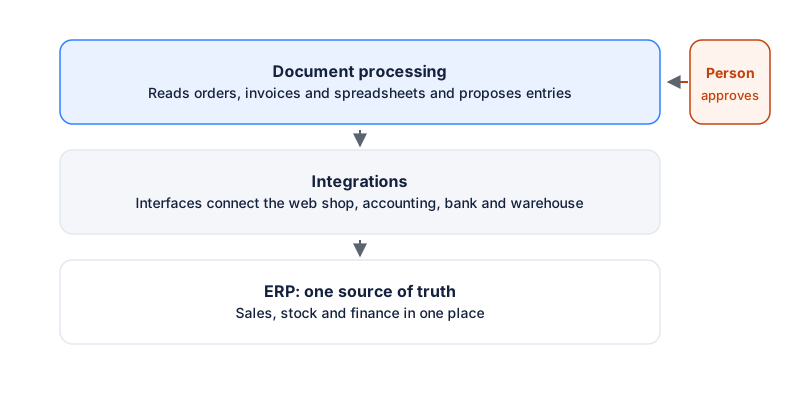
Figure 2: Data flows from top to bottom. A person approves before anything is booked in the ERP.
Two things mainly decide the choice: who builds and maintains the automation, and how much programming is needed. Light configuration is often enough for simple transfers. More complex rules and exceptions usually need developer skills or a maintenance partner. Ask every supplier how data goes in and out, who owns the integration and what happens when the system is down.
Common pitfalls
- Automating an unclear process. If steps and responsibilities are not clear, automation repeats the confusion faster.
- Data quality is not checked. Product codes, customer records and prices need cleaning before transfer. This often takes longer than installing the software.
- Nobody owns it. When no one is responsible for an integration, it breaks quietly, and nobody notices until a customer complains.
- No plan for exceptions. You need a way to work by hand when the system is down, and an agreed way to restart automation without double entries.
- Everything at once. A large change is harder to test and easier to break. A small start gives time to learn.
Rollout in four stages
Rollout is best done step by step. Figure 3 shows the sequence.
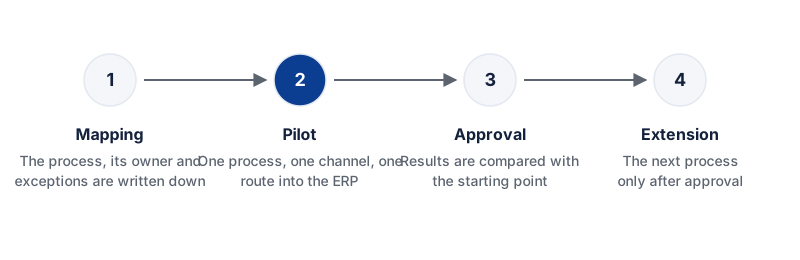
Figure 3: The next process is switched on only after the previous one has been approved.
- Mapping. The process, its owner and its exceptions are written down. The starting point is measured: how much time and how many errors the process involves today.
- Pilot. One process and one channel are chosen. Automation runs alongside the current work, and a person checks everything.
- Approval. Results are compared with the starting point. If reliability is not enough, the process is improved before moving on.
- Extension. The next process or channel is added only when the previous one works without surprises.
Measuring the starting point matters. Without it, it is hard to say whether anything improved, and approval rests on opinion.
Checklist before automating
- Is the process written down and is its owner named?
- Do you know how often the process repeats and what the errors cost?
- Are product data, customer data and prices cleaned up?
- Do you know the first channel and where the data is finally booked?
- Is there a way to work by hand when the system is down?
- Who approves external messages and significant entries?
- How is the starting point measured, so the change can be assessed?
How we work
We start with one process and the question of where data is copied by hand. We then describe the current process and mark the points where data goes in twice. A person approves every external message and every significant entry until the process is reliable. Automation grows only after the first process has been accepted.
For how we manage projects, read PMBOK and automation projects. Our security principles are on the security page.
If you want to know which of your processes could be automated, we start with a diagnosis. We go through one order or invoice process and show where automation would help most. Prices and terms are on the pricing page.