
Using AI in a company: example scenarios
Examples of where AI can be used in sales, marketing, customer service, HR and documents. Each one keeps a person in the decision, and each item is a candidate, not a proven result.
This page shows example scenarios. They are not customer stories and not promises. Each item is marked candidate: it has not yet been tested on a customer’s own data. Percentages, time savings and accuracy figures are not shown before a pilot.
All scenarios share one rule: AI proposes and a person decides. The AI does not send external messages, does not make decisions about people and does not publish content without approval.
CRM and sales
Salespeople spend part of their time entering data into the CRM. The scenario has three parts:
- Entries from emails and notes. AI reads emails and call notes and proposes the fields to fill in the CRM. The salesperson approves them.
- Quote draft. AI assembles a draft from the deal history and the price list. The salesperson checks prices and discounts.
- Support in negotiation. AI looks up product details, earlier similar cases and prices. It does not decide on discounts by itself.
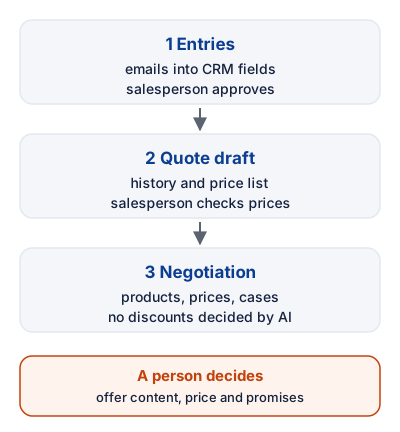
Figure 1: CRM and sales in three steps. A person decides at every step.
A person decides: the content of the offer, the price and what is promised to the customer.
Marketing
Marketing has a lot of repetitive work: content for several channels, tailoring messages and reporting. The scenario:
- Messages by purchase history. Customers are grouped by purchases and interest. AI drafts a message for each group.
- Content for channels. The same message is adapted for blog, email and social media while the tone stays consistent. The marketer approves publication.
- Reporting. AI combines figures from the CRM and ad reports into one report. Every figure can be traced to its source.
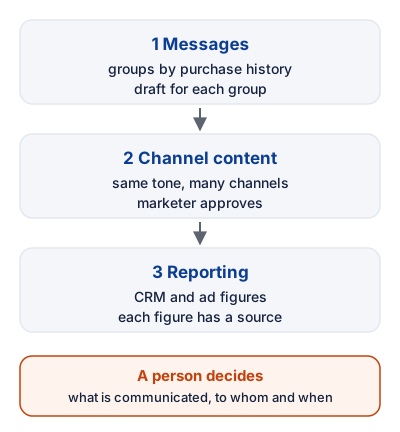
Figure 2: Three marketing steps. The marketer approves publication.
A person decides: what is communicated, to whom and when, and which figures in the report are treated as true.
Customer service
Customers expect quick answers, and the same questions come back. The scenario:
- Routine questions. AI answers narrow questions such as opening hours, delivery time and order status. The answer is taken from the system or the knowledge base. If the information is missing, the message goes to a person.
- Urgent and negative messages. AI recognises messages with urgency or frustration and moves them to the top of the person’s queue. It does not try to resolve them on its own.
- Knowledge base updates. When the same question keeps coming up, AI proposes a new or updated answer. A person approves it before publication.
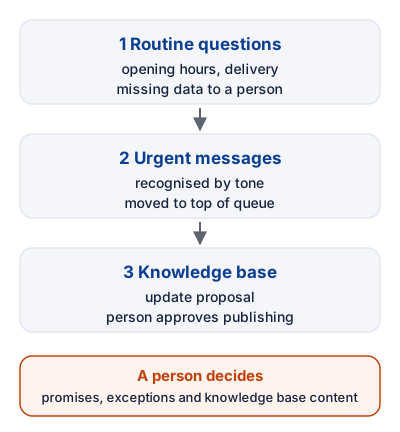
Figure 3: Customer service in three steps. Promises stay with a person.
A person decides: what is promised to the customer, how exceptions are handled and what is published in the knowledge base.
HR
HR has a lot of administrative work. Using AI here also carries a strict responsibility for personal data and decisions, so this scenario is limited on purpose.
- Handling applications. AI summarises applications and compares them with the job requirements. It does not assess the person and does not rank applicants as a basis for a decision.
- Onboarding. AI proposes an onboarding plan and answers frequent questions about forms and rules. The content comes from sources that HR has approved.
- Document templates. A contract, notice or other document is created from an approved template. A person checks any legal content.
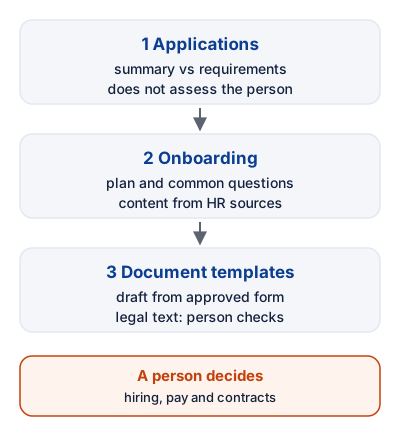
Figure 4: HR in three steps. A person always decides on hiring.
A person decides: on recruitment, pay and other personnel decisions. A data protection assessment is made before use.
Documents
Contracts and invoices arrive through many channels, and data is often typed in by hand. The scenario:
- Extracting data. AI pulls amounts, due dates and terms from invoices and contracts. Each extracted value is shown next to its place in the source, so it can be checked.
- Comparing versions. Two versions of a contract are compared and the differences are listed. A person judges what the differences mean legally.
- Classification and archiving. AI proposes a category and metadata for a document. Categories are agreed once, and documents are not deleted automatically.
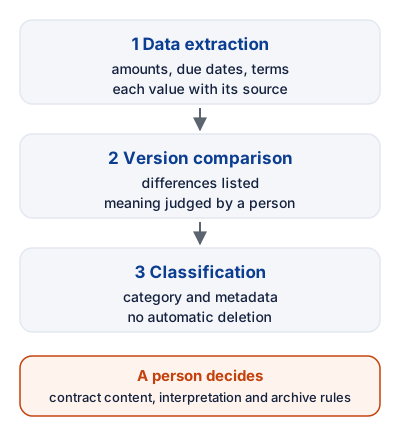
Figure 5: Document processing in three steps. Every extracted value is shown with its source.
A person decides: the content of the contract, legal interpretation and the rules for archiving.
What this page does not promise
- No percentages, time savings or accuracy figures without the customer’s own data.
- No legal advice.
- No data protection certification or other certifications.
How we start
We choose one scenario and one channel, run it alongside the current work and measure the starting point and the result. Extension happens only after the first scenario works. Read more about AI agents and automation tools. Prices and terms are on the pricing page.